
When people visit a website, they expect it to load quickly. They do not want to wait for oversized images, heavy scripts, bloated stylesheets, or unnecessary code to slow everything down. That is exactly why tools like Page Size Checker by SpellMistake can be useful for website owners, bloggers, developers, SEO professionals, and even beginners who simply want a faster site.
If you have ever wondered why your web page feels slow, why your bounce rate is high, or why users leave before your content finishes loading, page size may be part of the problem. A page can look simple on the surface and still carry too much weight in the background. That hidden weight affects speed, user experience, mobile performance, and even search visibility.
In this guide, we will break down what page size means, why it matters, how Page Size Checker by SpellMistake can help, and what practical steps you can take to reduce page size without harming design or functionality.
What Is Page Size?
Page size refers to the total amount of data that a web page loads when someone visits it. This includes:
- HTML files
- CSS files
- JavaScript files
- Images
- Fonts
- Videos
- External scripts
- Embedded widgets
- Tracking codes
In simple words, page size is the “weight” of your page. The larger the weight, the more data a browser must download before the page becomes fully usable.
A lightweight page usually loads faster. A heavy page often loads slower, especially on mobile devices or slower internet connections.
That is where a tool like Page Size Checker by SpellMistake becomes helpful. It gives you a clearer idea of how large your page is so you can decide whether optimization is needed.
May be you like it:
Words That Rhyme With Confusing: Complete Guide
Words Often Confused Worksheet: Learn, Practice, and Master English
Writing Tips First Person POV Using “I” a Lot – Complete Guide
Why Page Size Matters So Much
Many site owners focus only on design, content, and keywords. Those things matter, but page performance matters too. A slow, oversized page can quietly damage everything else you are trying to improve.
Better User Experience
Visitors want instant access to information. If your page takes too long to load, many users will leave before reading the first paragraph. A smaller page size helps content appear faster, which improves the overall browsing experience.
Improved Mobile Performance
Not everyone visits your site using fast desktop internet. Many people browse on mobile data with limited speed. Large page sizes can make mobile pages frustratingly slow. Reducing page size helps your content reach users more smoothly across devices.
Lower Bounce Rate
A heavy page can increase bounce rate because people lose patience. If your site loads quickly and feels responsive, users are more likely to stay, scroll, and interact.
Stronger SEO Support
Search engines care about page experience. While page size alone is not the only ranking factor, it directly affects speed and usability, which can influence overall performance in search results.
Reduced Bandwidth Usage
Smaller pages consume less bandwidth. This can lower hosting pressure and improve load consistency for visitors.
Higher Conversion Potential
Whether you run a blog, an online store, or a service website, faster pages can help users complete actions more easily. Better performance can support better conversions.
What Is Page Size Checker by SpellMistake?
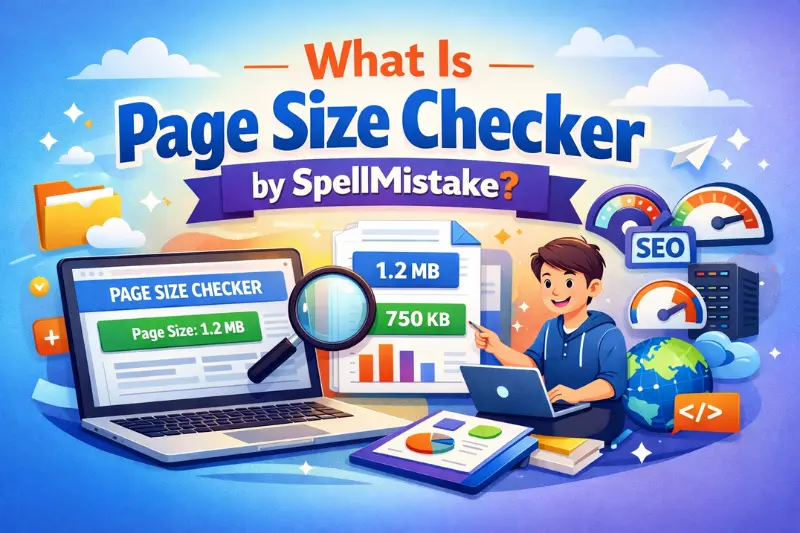
Page Size Checker by SpellMistake is a tool designed to help users check how large a web page is. Instead of guessing whether a page is lightweight or bloated, you can use the tool to get a clearer measurement.
This is valuable because many websites grow over time. New plugins, scripts, ad codes, fonts, and media files get added little by little. Eventually, the page becomes much heavier than expected. A checker helps reveal that hidden issue.
In practical terms, the tool can help you:
- Measure page weight
- Spot performance concerns
- Monitor optimization progress
- Compare different pages
- Make smarter technical decisions
For website owners who want a quick and simple check, this kind of tool can serve as a useful starting point.
Who Should Use a Page Size Checker?
A lot of people assume this kind of tool is only for developers. That is not true. It can help a wide range of users.
Bloggers
If you publish articles with many images, ads, or embedded elements, page size can grow fast. A checker helps you keep blog posts efficient.
SEO Professionals
SEO is not only about keywords and backlinks. Technical health matters too. A page size checker helps identify pages that may hurt speed and user experience.
Web Developers
Developers can use the tool while building or debugging pages to make sure assets do not become unnecessarily heavy.
Store Owners
eCommerce sites often include large images, sliders, reviews, scripts, and third-party apps. That can create serious performance issues. A page size checker helps track the damage.
Agencies and Freelancers
If you manage client websites, page size checks can support audits and performance recommendations.
Beginners
Even if you are new to websites, a page size checker can give you valuable insight without requiring advanced technical knowledge.
How Page Size Affects Website Speed
Page size and speed are closely connected, but they are not exactly the same thing. A page may be large and still load reasonably well if the server is strong and files are optimized. On the other hand, a smaller page may still feel slow if there are render-blocking scripts or poor hosting.
Still, in most cases, larger page size means more data must be transferred. That adds time.
Here is what usually happens when a page is too heavy:
- Browser downloads more files
- Images take longer to appear
- Scripts delay interactivity
- Fonts load slowly
- Mobile users suffer the most
- Core page content appears later
This is why checking page size is useful. It gives you a performance clue before users start complaining.
Common Causes of Large Page Size
If your page size is bigger than expected, one or more of these issues may be responsible.
Uncompressed Images
Large images are one of the biggest reasons pages become bloated. Uploading a full-resolution image directly from a camera or design tool can dramatically increase page weight.
Too Many JavaScript Files
Extra scripts, tracking tools, chat widgets, sliders, and popups can make a page much heavier.
Bloated CSS
Some websites load massive CSS files, including styles that are never even used on the page.
Too Many Fonts
Custom fonts look attractive, but loading multiple font families and weights can increase page size.
Embedded Videos and Widgets
External embeds from YouTube, social media, maps, and other platforms add more requests and more weight.
Poor Plugin Management
On CMS platforms, too many plugins often add unnecessary scripts and styles.
No Caching or Compression
Without proper compression, files are transferred in larger form than necessary.
How to Use Page Size Checker by SpellMistake Effectively
Using the tool is usually simple, but using it effectively requires a bit of strategy.
Check Important Pages First
Start with pages that matter most, such as:
- Homepage
- Landing pages
- Blog post templates
- Product pages
- Category pages
- Service pages
These are often the pages that drive the most traffic or conversions.
Compare Different Types of Pages
A homepage may have a different weight than a single blog post. A product page may be heavier because of images and reviews. Compare them to understand which section needs the most improvement.
Test Before and After Changes
If you compress images, remove a script, or change themes, test the page again. That helps you measure the real effect of your optimization work.
Monitor Growth Over Time
A page may start lightweight but become bloated later. Regular checks help you catch problems early.
Use It Alongside Other Tools
A page size checker is useful, but it should not be your only performance tool. Combine it with speed testing, mobile testing, and core performance analysis for a fuller picture.
What Is a Good Page Size?
There is no one perfect number that fits every website. A simple article page can be much lighter than an advanced web app or a feature-rich online store.
Still, smaller is generally better, as long as the page still works well and looks professional.
A practical mindset is this:
- Keep essential pages as light as possible
- Avoid unnecessary assets
- Optimize heavy elements first
- Focus on real user experience, not vanity numbers
The goal is not to make the page empty or unattractive. The goal is to remove waste.
May be you like it:
Tips For Writing Lyrics: A Complete Step-by-Step Guide
Tips for Writing Wedding Vows That Feel Real, Personal & Unforgettable
ACT Grammar Rules: The Complete Guide to Master ACT English
Smart Ways to Reduce Page Size
If Page Size Checker by SpellMistake shows that your page is too heavy, do not panic. Most websites have room for improvement.
Compress Images Properly
Resize images before uploading them. Use modern formats when possible and avoid using giant dimensions for small display areas.
Lazy Load Media
Lazy loading delays non-essential images or videos until the user scrolls near them. This reduces the initial page load burden.
Minify CSS and JavaScript
Minification removes unnecessary spaces and characters from code files, making them smaller.
Remove Unused Code
Many themes and plugins load assets you do not need. Identify and remove them where possible.
Limit Third-Party Scripts
Every extra widget or tracking code adds weight. Use only what genuinely helps your site.
Use Fewer Font Variants
You may not need five different font weights and three font families. Simplifying typography can improve performance.
Enable Compression
Gzip or Brotli compression can significantly reduce transfer size for text-based files.
Choose Better Hosting
Even a well-optimized page can struggle on poor hosting. Server quality matters.
Page Size and SEO: What Is the Real Connection?
Some people overstate the relationship between page size and SEO. Others ignore it completely. The truth sits in the middle.
A large page size does not automatically mean your page will rank poorly. But oversized pages often create slow loading times, poor mobile experience, and weaker engagement signals. Those issues can indirectly affect search performance.
Search engines want to show pages that are useful and accessible. If users click your result and face a slow, frustrating experience, that is not good for long-term performance.
So while Page Size Checker by SpellMistake is not an SEO tool in the traditional keyword sense, it supports technical quality, which supports SEO.
Mistakes to Avoid When Checking Page Size
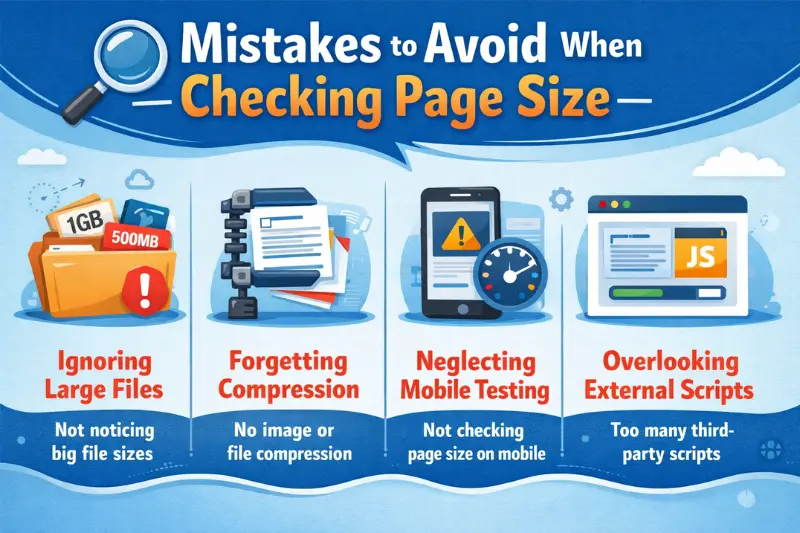
Checking page size is useful, but only if you interpret the results correctly.
Do Not Obsess Over One Number
A page size result is important, but it is not the whole story. You also need to consider speed, render delay, hosting, caching, and script behavior.
Do Not Sacrifice Quality Blindly
Reducing page size is good, but not if it ruins image quality, functionality, or design. Optimization should be smart, not destructive.
Do Not Ignore Mobile Users
Desktop performance can look acceptable while mobile performance remains poor. Always think mobile-first.
Do Not Keep Adding Tools Without Review
Ironically, many site owners install performance tools that add extra load themselves. Every addition should be justified.
Do Not Check Only Once
Websites change constantly. Performance monitoring should be ongoing.
Why Simple Tools Still Matter
Some people prefer advanced audit platforms with dozens of metrics, waterfall charts, and technical breakdowns. Those are useful, but simple tools still have real value.
A straightforward checker like Page Size Checker by SpellMistake can help users quickly understand whether a page is becoming too heavy. It removes guesswork and encourages better habits.
For beginners, simplicity is powerful. For professionals, quick checks save time. Not every task needs a complicated dashboard. Sometimes you just need a direct answer.
Best Practices After Using a Page Size Checker
Once you have your result, take action based on priority.
Start by asking:
- Which files are adding the most weight?
- Are those files necessary?
- Can they be compressed or deferred?
- Is the page heavy because of design choices or technical mistakes?
- Does the page need everything it currently loads?
Then work in order:
- Fix the biggest image issues
- Remove unnecessary scripts
- Simplify fonts and effects
- Minify and compress files
- Test again
- Compare results
- Repeat where needed
Optimization is rarely a one-time task. It is a process of improvement.
FAQs
What does Page Size Checker by SpellMistake do?
It helps measure the size of a web page so you can understand how heavy it is and whether optimization may be needed.
Is page size the same as page speed?
No. They are related, but not identical. Page size is the amount of data loaded, while page speed is how quickly the page becomes usable.
Why is a large page size bad?
A large page size can slow loading time, especially on mobile or slower internet connections, which can hurt user experience and engagement.
Can reducing page size improve SEO?
It can help indirectly by improving speed, usability, and overall page experience.
What usually makes a page too large?
Common causes include uncompressed images, too many scripts, large CSS files, extra fonts, and third-party widgets.
How often should I check page size?
It is a good idea to check regularly, especially after redesigns, plugin changes, or adding new content.
Final Thoughts
If you care about website speed, user experience, and overall site quality, page size deserves attention. Too many site owners focus only on what users see and ignore what browsers must load behind the scenes. That hidden layer matters more than many people realize.
Page Size Checker by SpellMistake can be a practical tool for identifying whether a page is carrying unnecessary weight. It helps turn vague performance concerns into measurable insight. Once you know your page size, you can make smarter decisions about images, scripts, design elements, and technical cleanup.
The best websites are not just attractive. They are fast, usable, and efficient. A lighter page can improve browsing, support SEO, reduce frustration, and create a better experience for every visitor.
If your website feels slow, start with the basics. Check the page size. Find the heavy parts. Remove what does not belong. Improve what matters. That simple process can lead to meaningful results over time.
May be you like it:
SEO Agency in Australia UploadArticle: The Complete Guide to Choosing the Right Partner in 2026
The Ultimate Guide to UploadArticle: Boost Your SEO & Reach More Readers
UploadArticle Relationship: The Complete Strategy to Get Published, Approved & Ranked