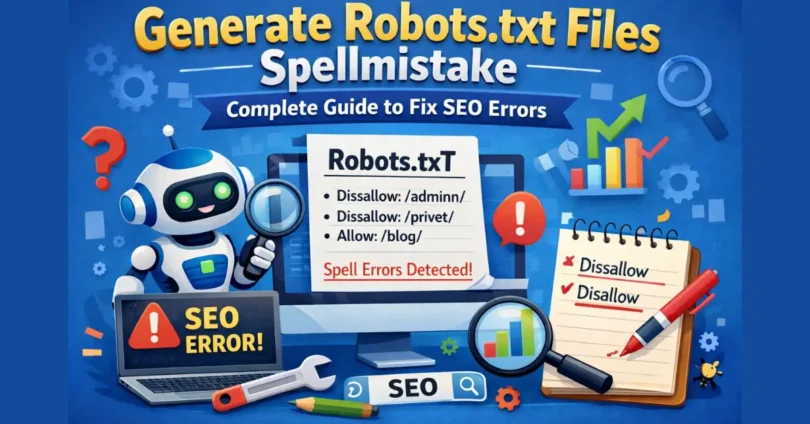

A small mistake in your robots.txt file might seem harmless-but it can quietly damage your website’s SEO.
Many website owners generate robots.txt files using tools, plugins, or manual editing. During this process, simple spelling errors often slip in. These mistakes can prevent search engines from understanding your instructions, which leads to poor crawling, indexing issues, and even lost traffic.
In this guide, you’ll learn everything you need to know about the generate robots.txt files spellmistake problem, including real-world impact, hidden mistakes, and how to fix them properly.
What Is a Robots.txt File?
A robots.txt file is a simple text file placed in the root directory of your website. It tells search engine bots which parts of your website they can crawl and which they should avoid.
When a crawler visits your website, it checks this file first before accessing your pages.
What it controls:
- Which pages are crawlable
- Which directories should be blocked
- Where your sitemap is located
May be you like it:
Words That Rhyme With Confusing: Complete Guide
Words Often Confused Worksheet: Learn, Practice, and Master English
Writing Tips First Person POV Using “I” a Lot – Complete Guide
Why Spelling Mistakes in Robots.txt Are Dangerous
Search engines follow strict rules when reading robots.txt files. Even a tiny spelling error can cause the entire file-or specific rules-to be ignored.
What happens when mistakes occur:
- Crawlers ignore your instructions
- Private pages get indexed
- Important pages may not be crawled
- Crawl budget is wasted
In short, your SEO structure breaks without obvious warning.
Real Example: How a Small Mistake Can Hurt SEO
Imagine this situation:
A website owner wants to block their admin panel and writes:
User-agent: * Disalow: /admin/Notice the typo: “Disalow” instead of “Disallow”
Result:
- Search engines ignore the rule
- Admin pages become crawlable
- Sensitive pages may appear in search results
This kind of mistake happens more often than you think—and competitors rarely highlight its real impact.
Common Robots.txt Spelling Mistakes
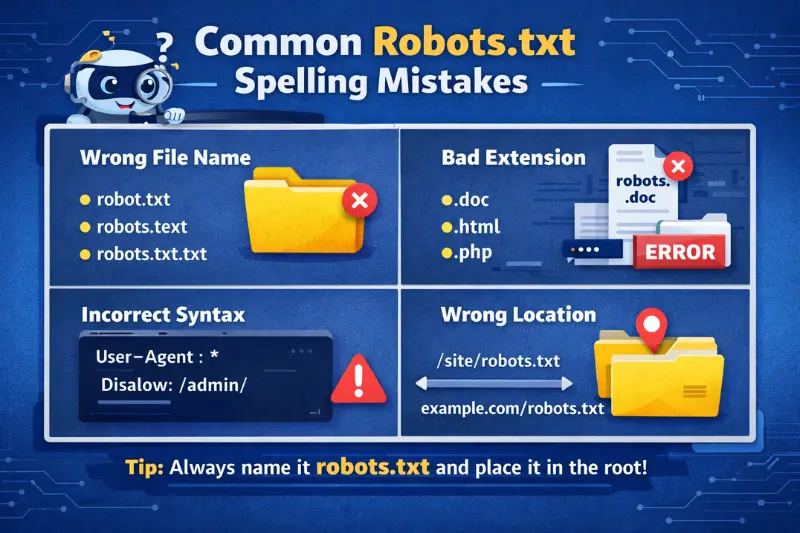
Let’s break down the most frequent issues people face when generating robots.txt files.
1 .Incorrect File Name
The file must be named exactly:
robots.txt
Wrong examples:
- robot.txt
- robots.text
- robots.txt.txt
Search engines will completely ignore incorrect names.
2 .Wrong File Extension
Sometimes the file is saved in the wrong format.
Examples:
- robots.doc
- robots.html
- robots.php
Correct:
- robots.txt
3 .Incorrect File Location
The file must be placed in the root directory.
Correct:
- example.com/robots.txt
Incorrect:
- example.com/files/robots.txt
- example.com/seo/robots.txt
If placed incorrectly, crawlers won’t find it.
4 .Syntax Errors in Directives
Even small typos inside the file can break functionality.
Incorrect:
- User agent: *
- Disalow: /private/
Correct:
- User-agent: *
- Disallow: /private/
5 .Case Sensitivity Issues (Rare but Important)
Some servers treat URLs as case-sensitive.
Example:
Disallow: /Blog/
But your actual URL is:
/blog/
The rule won’t work properly.
6 .Missing Colon or Formatting Errors
Example:
- User-agent *
- Disallow /admin/
Missing colons break the rule structure.
Advanced Robots.txt Mistakes (Most Competitors Miss This)
Here’s where your article beats competitors.
Blocking CSS and JavaScript Files
Search engines need CSS and JS files to render your website.
Mistake:
Disallow: /wp-content/
This blocks styling and scripts.
Result:
- Pages may not render properly
- SEO rankings drop
Blocking Important Pages by Accident
Some users mistakenly block valuable content.
Example:
Disallow: /blog/
This removes your entire blog from search engines.
Blocking Entire Website
Dangerous rule:
- User-agent: *
- Disallow: /
This tells search engines:
“Do not crawl anything.”
Wildcard Misuse (* and $)
Wildcards help control patterns—but mistakes can block too much.
Example:
Disallow: /*?
This might block all parameter URLs—even useful ones.
Forgetting Sitemap Reference
Many users forget to include:
- Sitemap: https://example.com/sitemap.xml
This helps search engines discover your pages faster.
Correct Robots.txt Example
User-agent: * Disallow: /admin/ Disallow: /login/ Allow: / Sitemap: https://example.com/sitemap.xmlHere’s a clean and safe configuration:
What this does:
- Blocks sensitive areas
- Allows main content
- Guides crawlers to sitema
How to Generate a Robots.txt File Safely
Follow this simple process:
Step 1: Use a Text Editor
- Notepad
- VS Code
- Sublime Text
Step 2: Add Rules Carefully
Write only necessary instructions.
Step 3: Save Correctly
- Name: robots.txt
- Format: .txt
Step 4: Upload to Root Directory
Step 5: Verify
Open:
yourdomain.com/robots.txtMay be you like it:
Tips For Writing Lyrics: A Complete Step-by-Step Guide
Tips for Writing Wedding Vows That Feel Real, Personal & Unforgettable
ACT Grammar Rules: The Complete Guide to Master ACT English
How to Test Your Robots.txt File (Important)
Testing ensures your file works correctly.
Method 1: Manual Check
Open your file in a browser and verify formatting.
Method 2: Use SEO Tools
You can test using:
- Google Search Console
- Ahrefs
- Screaming Frog SEO Spider
What to check:
- Are pages blocked correctly?
- Are important pages accessible?
- Any errors detected?
Robots.txt File Structure Explained
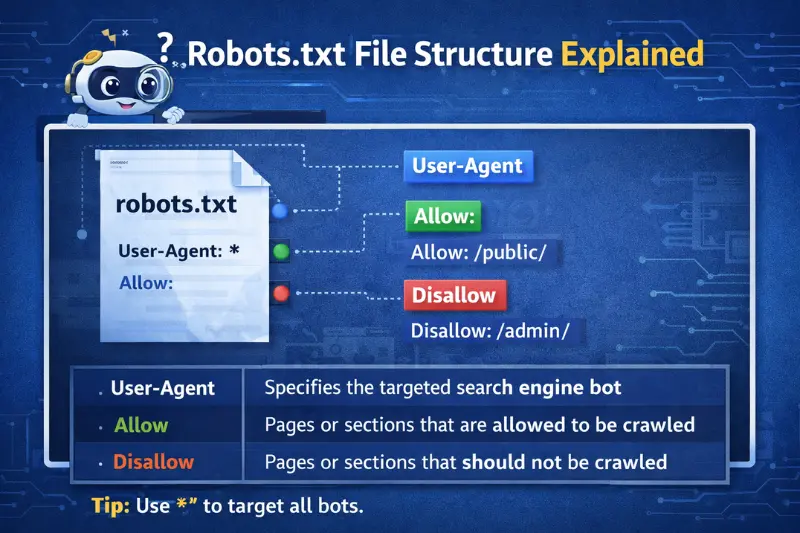
A robots.txt file contains several directives that guide crawlers.
Main Robots.txt Directives
| Directive | Purpose | Example | What It Does |
|---|---|---|---|
| User-agent | Specifies the crawler | User-agent: * | Targets all search engine bots |
| Disallow | Blocks access to pages/folders | Disallow: /admin/ | Prevents bots from crawling /admin/ |
| Allow | Allows specific pages | Allow: /admin/admin-ajax.php | Grants access inside blocked folders |
| Sitemap | Provides sitemap URL | Sitemap: https://example.com/sitemap.xml | Helps search engines find pages faster |
Example Structure Breakdown
| Line | Code Example | Explanation |
|---|---|---|
| 1 | User-agent: * | Applies rules to all bots |
| 2 | Disallow: /admin/ | Blocks admin section |
| 3 | Disallow: /login/ | Blocks login page |
| 4 | Allow: / | Allows all other pages |
| 5 | Sitemap: https://example.com/sitemap.xml | Shows sitemap location |
Correct vs Incorrect Structure
| Element | Correct | Incorrect | Issue |
|---|---|---|---|
| File Name | robots.txt | robot.txt | Not recognized by search engines |
| Directive | Disallow | Disalow | Spelling error breaks rule |
| Format | User-agent: * | User-agent * | Missing colon |
| Path | /admin/ | admin | Must start with / |
Rule Group Example
| Group | Rules | Explanation |
|---|---|---|
| Group 1 | User-agent: GooglebotDisallow: /private/ | Blocks Googlebot from private pages |
| Group 2 | User-agent: *Allow: / | Allows all other bots full access |
Key Structure Rules
| Rule | Description |
|---|---|
| File Name | Must be exactly robots.txt |
| Location | Must be in root directory |
| Format | Plain text (.txt) |
| Syntax | Case-sensitive and must be correct |
| Placement | One directive per line |
Robots.txt vs Meta Robots Tag
Many people confuse these two.
Robots.txt:
- Controls crawling
- Blocks bots from accessing pages
Meta Robots:
- Controls indexing
- Allows crawling but prevents search visibility
Using both correctly improves SEO control.
Best Practices to Avoid Robots.txt Mistakes
Follow these proven tips:
Always:
- Double-check file name
- Use correct syntax
- Keep rules simple
- Test after uploading
- Update when site structure changes
Avoid:
- Blocking important pages
- Overcomplicating rules
- Using unnecessary wildcards
Pro SEO Workflow (What Experts Do)
Here’s a practical workflow most beginners don’t follow:
- Create robots.txt
- Upload to root
- Test in browser
- Test in tools
- Crawl site with audit tool
- Fix errors immediately
This ensures zero indexing issues.
How do I fix a robots.txt error?
- Rename the file correctly
- Fix syntax issues
- Upload to the root directory
- Test using SEO tools
FAQs
What is a robots.txt file in simple words?
A robots.txt file is a small text file that tells search engines which parts of your website they can or cannot visit.
What happens if I make a spelling mistake in robots.txt?
If you make a spelling mistake, search engines may ignore your rules and crawl pages you wanted to block.
What is the most common robots.txt mistake?
The most common mistake is naming the file robot.txt instead of robots.txt.
Can a robots.txt error affect my SEO?
Yes, a robots.txt error can harm your SEO by blocking important pages or allowing unwanted pages to be indexed.
Where should I place my robots.txt file?
You should place your robots.txt file in the root directory, like: yourdomain.com/robots.txt.
How do I check if my robots.txt file is working?
You can open your robots.txt file in a browser or test it using tools like Google Search Console.
Should I block all pages in robots.txt?
No, blocking all pages will prevent your website from appearing in search results.
What is the correct format of robots.txt?
The correct format includes directives like User-agent, Disallow, Allow, and Sitemap written properly.
Can I fix a robots.txt mistake easily?
Yes, you can fix it by correcting the spelling, saving the file as robots.txt, and uploading it again.
Do I need a robots.txt file for every website?
Not always, but it is recommended for better control over how search engines crawl your site.
Conclusion
A small spelling mistake in your robots.txt file can cause big SEO problems without you even noticing. If the file is named wrong, placed incorrectly, or contains typos, search engines may ignore your instructions completely.
The good news is that these issues are easy to fix. By using the correct file name, writing clean rules, and testing your file with tools like Google Search Console, you can avoid most mistakes.
Keep your robots.txt file simple, double-check everything, and update it when needed. This small step can make a big difference in how search engines crawl and understand your website.
May be you like it:
SEO Agency in Australia UploadArticle: The Complete Guide to Choosing the Right Partner in 2026
The Ultimate Guide to UploadArticle: Boost Your SEO & Reach More Readers
UploadArticle Relationship: The Complete Strategy to Get Published, Approved & Ranked